Thursday, May 14, 2020

How to Start a Podcast in 2020: No Fluff (Just the Essentials)

The time has come.

You know that idea bouncing around in the back of your mind? That dream, fearlessly waging war against your internal fears?

It’s time to let it out.

It’s time to start your podcast.

The only problem?

You don’t know how to start a podcast. And the thought of wading through a 20,000-word “Ultimate Guide” leaves you with a roaring headache and the overwhelming desire to ditch your podcasting dreams.

Well, no more excuses. This article will teach you everything you need to know about starting a podcast, and it’ll do it without filler, fluff, and long-winded details that don’t really matter.

So let’s dive in, shall we?

  • Step 1:

Choose a Topic for Your Podcast

Start a Podcast: Step 1 - Choose a Topic for Your Podcast

First things first…

Why do you want to start a podcast?

If your answer is “to get rich and famous,” try again. Podcasting can help you generate business leads, elevate your reputation, and yes, even contribute to your bottom line, but it is a commitment. The rewards come only if you persist.

That means you need to start with a topic you are passionate about. One that you’re so obsessed with, your friends sometimes have to kindly ask you to shut up about it.

If you’re reading this article, you probably already have an idea about that topic. So let’s consider the other half of the equation: your listeners.

The key to choosing a topic for your podcast is to search for that magical zone where your obsessions overlap with your audience’s interests.

So before committing to a topic, look for similar podcasts to see how many followers and reviews they have.

If there are already many popular podcasts in your niche, that’s a good sign: The more people producing and consuming podcasts on a topic, the more viable the topic.

Next, try to come up with a list of 50-100 potential episodes on this topic. If it’s easy for you to brainstorm this list, then that’s another good sign.

But be careful.

You don’t want a topic so broad it won’t appeal to your specific audience. As comedian Bill Cosby once said, “I don’t know the key to success, but the key to failure is trying to please everybody.”

Your core demographic is not “everybody.” Think about your ideal listener and choose a topic that is narrow enough for you to stand out, yet broad enough for you to speak on it for 100+ episodes.
  • Step 2:

Name Your Podcast

Start a Podcast: Step 2 - Name Your Podcast

Now that you’ve chosen your podcast topic, it’s time to name it!

You want a name that is specific and clear, yet unique enough to catch the attention of your audience.

For example, the Smart Blogger podcast, Break Through the Noise with Jon Morrow, has the flexibility to cover a wider range of topics as it grows. It’s not locked into an overly narrow theme.

As you are brainstorming the perfect name for your podcast, here are some best practices to keep in mind:

Be clear

Ideally, listeners should know what your podcast is about just by its name. This is not 100% necessary, since most podcast platforms include a short description, but sometimes people don’t read descriptions, so better safe than sorry.

Examples:

Try to include your target keyword in the title

Apple podcasts is a search engine, and one of the best ways to help it recommend your podcast to the right listeners is to include your target keyword in the title. Just be careful not to keyword stuff! Make it natural.

Examples:

Be consistent

If you already have a brand, or a recognizable name, consider using that in your podcast.

Examples:

Combine strategies

Another option is to combine a clear title with your personal, brand, or business name.

Don’t be too long or wordy. You want to make it easy for people to find your podcast. If you still can’t decide on a name, look at other podcast names for inspiration. Check out podcasts inside and outside your niche.

Examples:

But don’t get stuck on this step. Pick a name and move on!

  • Step 3:

Create Artwork for Your Podcast

Start a Podcast: Step 3 - Create Artwork for Your Podcast

Your podcast cover art is the first thing people see about your podcast, even before they read your description. So create an image that grabs them.

Your image should communicate the subject of your podcast and hint at your personality. It reinforces your brand, so if you already have a certain look to your site, try to keep it consistent.

Creating an eye-catching cover image

Here are some best practices to keep in mind:

  • Use minimal text. The fewer words and characters, the better. Whatever text you use should be readable even at low resolutions, such as 150 x 150 pixels.
  • Your cover image should be a minimum of 1400 x 1400 pixels, max 3000 x 3000 pixels for larger screens like the iPad.
  • Shoot for 72 DPI (dots per inch) JPG or PNG format, under 500kb size in RGB color space.

How to create your own cover image

If you want to create your own artwork for your podcast, you can use a free service such as Canva. Simply type in “CD covers” (which are 1400 x 1400 pixels) while browsing templates, or create your own design from scratch.

If you want to take it one step further, you can create a vector-based illustration in a program such as Adobe Illustrator. These images remain clear at any size.

Hiring someone to create your cover art

If you prefer outsourcing your artwork, you can hire somebody through Upwork, Fiverr, or 99designs.

Give them the details of your podcast, as well as the podcast image dimension specifications, and any brand colors or images you want to include.

Note: if you are planning to invest time and money in hiring a professional to design your artwork for you, make sure you know what you want and give clear directions.
  • Step 4:

Add Music

Start a Podcast: Step 4 - Add Music

Music is another powerful element to include in your podcast.

Most podcasters use a few seconds of intro music, which becomes a familiar “theme song” that listeners associate with the show.

But be careful.

The one and only ironclad music rule is: Never ever use someone else’s copyrighted music.

Instead, look for royalty-free music or buy a one-time commercial license from platforms such as:

  • Shutterstock: Offers an unlimited music subscription for a monthly fee. You can also license individual tracks for a one-time price.
  • Audiojungle: Hundreds of thousands of tracks, sound effects, and jingles for any of your musical needs. You can buy a subscription or purchase individual items as needed.
  • Epidemic Sound: Subscribe (monthly or annually) to get access to tens of thousands of tracks and sound effects, with new tracks added weekly.
  • Melodyloops: Buy packets of royalty-free melodies for a set price.

If you’re on a budget, you can ask a musical friend to make you something, or check out these platforms:

  • Imcompetech: A collection of thousands of Creative Commons tracks (free to use if you properly attribute the artists and the track title) and paid licenses (if you don’t).
  • SilvermanSound: Royalty free music with attribution. You can also get a non-attribution license for a fee.
  • Free Music Archive: A collection of music from artists around the world. Free to download under the Creative Commons license.
  • Purple Planet Music: Offers royalty free music as well as paid high quality commercial license tracks.
  • DigCCMixtr: A music discovery site offering free and paid, commercial tracks.
  • Zapsplat: Tens of thousands of free and paid sound effects (and counting!) to use throughout your podcasts.

The downside of getting free music is that you won’t have music that is unique to your podcast.

Your listeners might hear snatches of the exact same track on other podcasts, YouTube channels, etc. So if you want exclusive music, buy it or hire someone to create it for you.

And take the time to find a track that you really like, because as your “signature sound,” you don’t want to change your music once you’ve begun.
  • Step 5:

Get a Microphone (And Other Podcasting Equipment)

Start a Podcast: Step 5 - Get a Microphone (& Other Equipment)

Assuming you already have a computer, you’re going to need 2-3 more things to get your podcast up and running:

  1. A microphone
  2. Audio editing software
  3. Other (optional) recording equipment

Your Microphone

To be a killer podcaster, you need a proper weapon. Ahem. I mean, microphone.

Audio is everything when it comes to podcasting, so if you want to splurge on something, get yourself a good microphone.

And whatever you do, do NOT use your built-in computer microphone. The audio quality is atrocious and there’s not much you can do on the editing end to fix that.

When choosing a microphone, you have a choice between two basic options:

USB vs XLR mics

USB mics are plug-and-play microphones that tend to be cheaper and easier to use, but less customizable than XLRs.

XLR mics require an extra cable and audio interface to work. They tend to be more expensive and higher quality than USB microphones.

An XLR mic + audio interface is the way to go if you have a co-host and need to record more than one person in one room, because plugging in multiple mics into USB ports can mess up your sound quality, and recording more than one person on one mic can make it difficult to edit your audio.

For a microphone that gives you the option of both USB and XLR, check out the Audio-Technica ATR2100x (affiliate link), Blue Yeti (affiliate link), or Samson Q2U (affiliate link) on Amazon.

Your Audio Recording-Editing Software

Audacity is a fantastic audio recording/editing software for beginners.

Audacity works on Windows, Mac, and Linux computers, and can record, playback, edit, and export your audio into a variety of different audio formats (MP3, WAV, FLAC, etc). Plus, unlike Pamela and some of its freemium competitors, Audacity is open-source and free.

If you are a Mac user, Garageband is another free audio software you already have, and if you want to dive deeper into home recording, you can also invest in a Digital Audio Workstation (DAW).

If you need any pro features that Audacity and Garageband don’t offer, Adobe Audition is $20.99 per month, and it’s available for both Windows and Mac.

Other (Optional) Recording Equipment

A pop filter

If it didn’t come with your microphone, you may want to buy a pop filter, a noise protection screen that helps to reduce or eliminate sibilance (hissing noises) and plosives (popping noises).

A pair of headphones

Headphones protect your microphone from picking up extra sounds from your computer speakers. They also help you hear what you sound like as you speak, so you can adjust your presentation style.

You don’t have to get fancy, a pair of earbuds will do just fine.

Boom arm

Depending on the microphone you buy, a boom arm (affiliate link) could be a worthwhile purchase. Decent ones are available on Amazon for under $20.

Interview Software

If you plan to talk to people long-distance, you’ll want to invest in interview software, such as:

  • Squadcast: This platform offers videoconferencing and records on separate tracks for each speaker.
  • Zoom: This easy-to-use tool for remote interviews offers above-average audio quality, but doesn’t save audio to separate tracks.
  • Callnote: This software records GotoMeeting, WebEx, Facetime, Skype, Google Hangouts, and more.

  • Step 6:

Pick Your Podcast Hosting

Start a Podcast: Step 6 - Pick Your Podcast Hosting

Although you may listen to your podcast via Apple Podcasts, Spotify, Google Podcasts, etc., as a podcaster, you don’t actually upload your episodes directly to those directories.

To share your podcast with your adoring fans, you’ll need a podcast host: a place to store and distribute your podcast’s audio recordings.

Hosts charge a monthly service fee to host your audio files and generate the RSS feed you need to submit your podcast to podcasting directories (so listeners can find you).

How to Pick a Podcast Host

Podcast hosts are (almost) as varied as cell phone providers. When choosing a host, consider these factors:

  • Longevity & dependability: Will your host stand the test of time?
  • Flexibility & adaptability: What is your host’s storage capabilities?
  • Website integrations: Does your host integrate with your website or create a site for you?
  • Analytics: How in-depth is your host’s analytics?
  • Monetization support: Will your host help or hinder your monetization efforts?

Here are a few podcast hosting services to look into:

Libsyn

Libsyn has been around since 2004, and offers plans with unlimited bandwidth and monetization options, WordPress integration (with their Libsyn Publisher Hub plugin) and detailed analytics.

Podbean

Podbean started in 2006, and offers 24/7 support, distribution to all the major apps and podcast directories, and your own podcast site. Their Unlimited Plus Plan, gives you access to a patron program, advertising capabilities, and video support.

Buzzsprout

Buzzsprout offers an easy-to-use analytics dashboard, making it easy to upload, schedule, fill in meta-details, and submit your podcast to multiple podcast directories.

Blubrry

Blubrry podcast hosting plans start at $12 per month. At that introductory price you get 100MB storage each month and unlimited bandwidth. If you need more, $80 per month will give you 1,000MB of storage space.

Free hosting

Some hosts offer free podcasting plans, but these plans come with limits:

  • Buzzsprout allows you to upload 2 hours of content which they host for 90 days.
  • Podbean allows you to upload 5 hours of content per month at max 100GB of bandwidth and only basic statistics.
  • Speaker’s free plan includes advertisements, you’ll need to pay to remove them.
  • Anchor is a 100% free platform focused on “democratizing audio.” But they were the center of a terms and conditions controversy in 2018.
  • Soundcloud allows you to upload up to 3 hours of audio only.

So be careful with free plans, and know that if you want your podcast to grow and be competitive, it’s worth investing in a good host.
  • Step 7:

Record Your First Episode

Start a Podcast: Step 7 - Record Your First Episode

Okay. You’ve prepared your topic, host, and podcast equipment, and you’re ready to roll!

So in this section, we’re going to go step-by-step through the podcast recording process:

Write Your Script

Podcasting is like giving a speech. It’s best if you plan what you’re going to say before you say it, by writing it out.

You don’t have to write everything word for word, but the more planning you do, the less problems you’ll have later.

You can write out a word-for-word speech, if you like, but remember that when you turn that microphone on, you want to speak as if talking to a friend.

Prepare Your Environment

Before you record your first episode, make sure that you’ve set up the best recording environment.

Remove all distractions (kids, pets, and annoying voice search devices) and choose a room that’s not located near a busy street and doesn’t have many hard reflective surfaces. Use curtains and carpets to absorb noise pollution.

Create Your Intro and Outro

If you plan to create a recurring intro and outro, have that ready to add to your episodes. In your intro, make sure you mention your podcast name, topic, and host name. And your outro is a great place to include your call to action.

Record Your Episode

With your script written and environment set up, you’re ready to start recording!

First, plug in your equipment and open your recording software. Make sure your computer recognizes your mic as the source of audio input, then hit record.

Remember, you don’t have to record a perfect voiceover in one take. Take your time, and feel free to re-record if you make mistakes.

Edit Your Audio (Post-Production)

Editing involves cutting out errors, reducing background noise, balancing sound levels, adding your intro and outro, and making the episode easier for people to hear.

If you used Audacity to record your audio, you can edit your audio file in the programs directly. (To learn how, check out Audacity’s tutorials.)

As always, you can also hire someone to help you with editing, if you prefer.

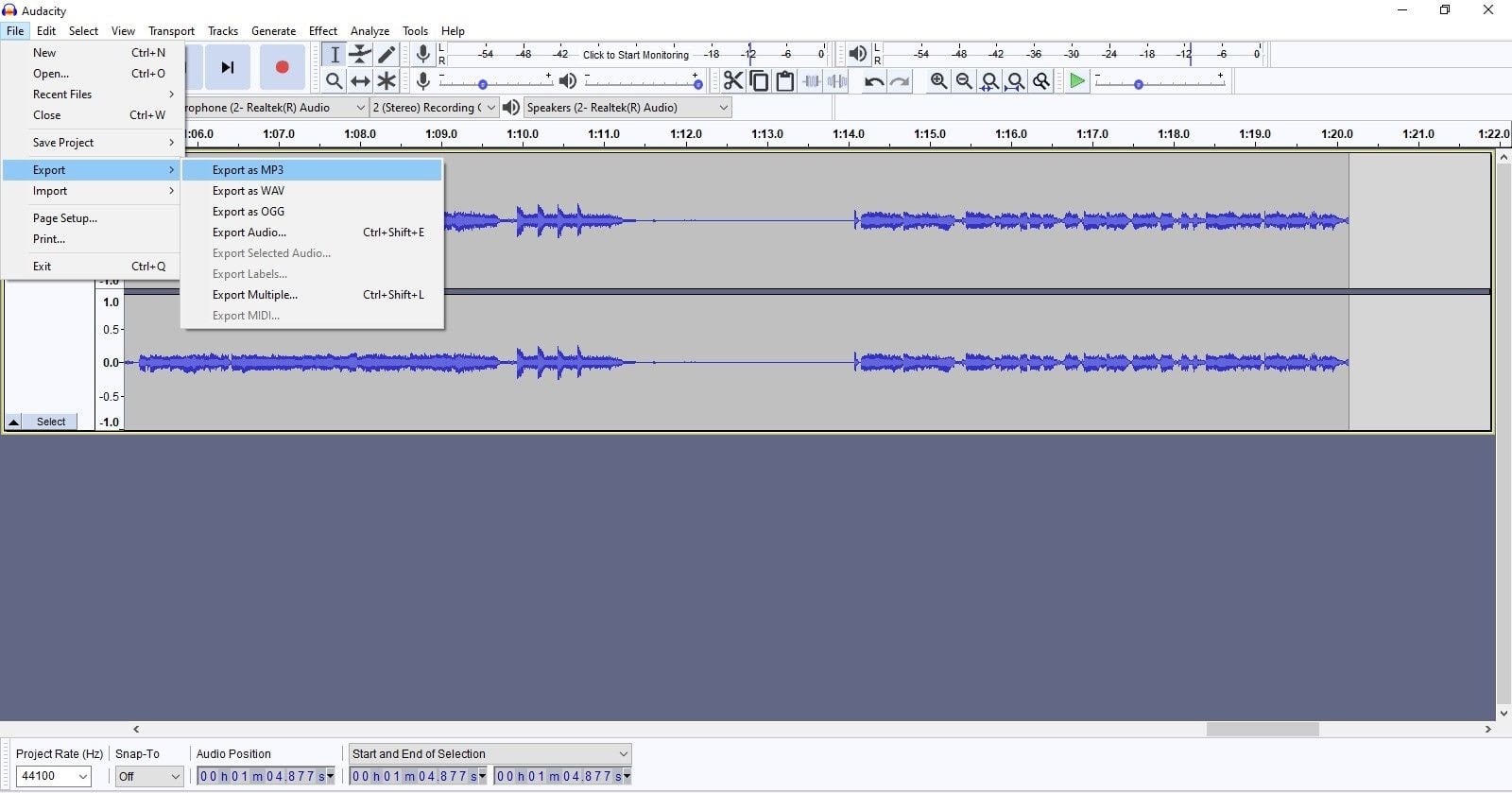
Save Your Recording

When you’re finished recording your audio, save it as an MP3 file. In Audacity, that means clicking on “File” → “Export” → “Export as MP3”:
Podcast audacity export mp3

Name your audio file using a template, something like “podcast name-episode number-episode name-date.”
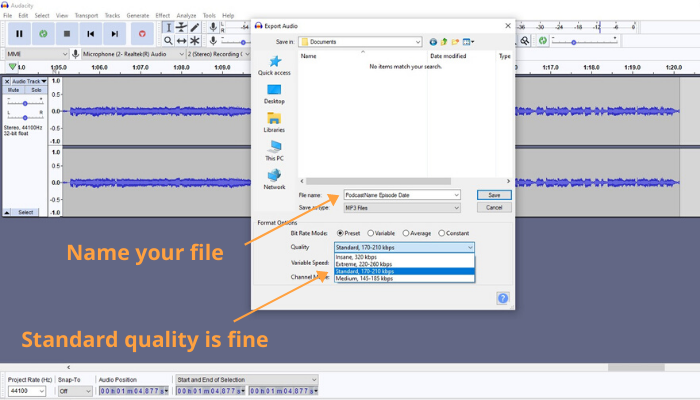
podcast audacity name file

If you’re using Audacity, the default standard quality MP3 should be fine. If you’re using a different service, shoot for a bitrate of around 128 kbps and 44.1Mhz (CD quality).
  • Step 8:

Upload Your Podcast Episode

Start a Podcast: Step 8 - Upload Your Podcast Episode

Once you’ve finished exporting your episode as an MP3 file, it’s time to upload your file to your host. Each host has their own way of doing things, so follow their instructions:

When you do, you’ll be prompted to include ID3 metadata that stores information related to an MP3 file.

You can also include this information when exporting your file from Audacity:
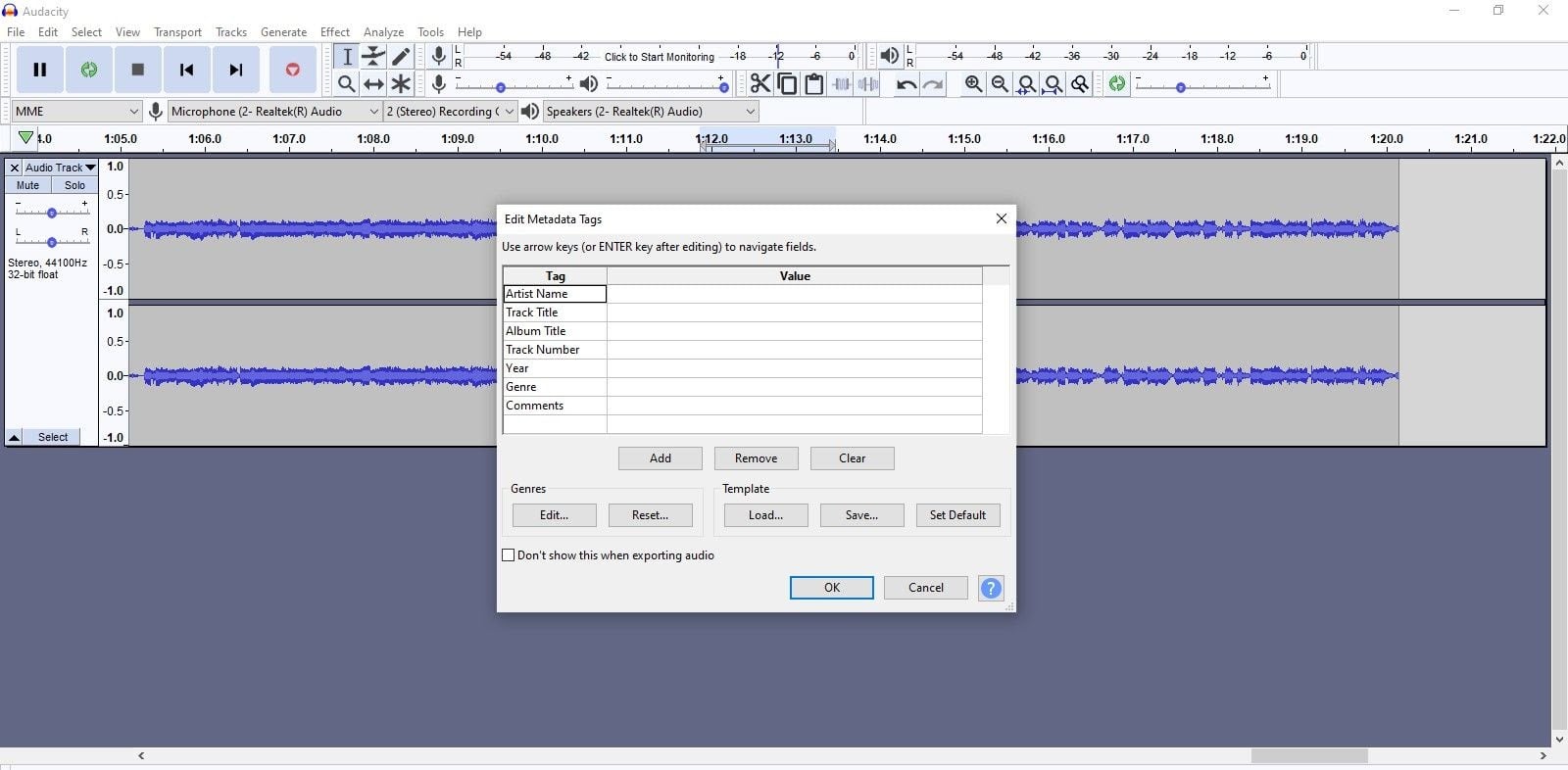
podcast ID3 tags

Audacity includes a space for you to add the artist name (in your case, podcast host name), track title (episode title), album title (podcast name), track number (episode number), year, genre, and other comments.

For each podcast episode, you’ll want to prepare an episode title so listeners know what your episode is about. You also want to include show notes, which can include a description of the content (including relevant keywords to make your episode easier to find), timestamps, links to your site, etc.

If this is your first time uploading to your host, you will be asked to include your podcast title, artwork, and description.

Then, once you’ve filled out all the necessary information, your host will pass it on to your podcast directories so that your podcast can be found by future fans.

And speaking of those directories…

  • Step 9:

Submit Your RSS Feed to Apple Podcasts (iTunes), Spotify, and Google/Android

Start a Podcast: Step 9 - Submit Your Feed to Apple, Spotify, and Google

Once you have your podcast created and hosted, submitting it to a directory is easy.

Some podcast hosts have easy one-click-button methods for uploading. If you chose one of those hosts, use their process.

For everyone else, here’s how you submit your podcast feed to the “Big 3” directories:

Uploading Your Podcast to Apple Podcasts

Step 1. Sign in to iTunes Connect using your Apple ID (if you don’t have one, you can create one for free).

Step 2. Click on the Podcasts Connect button.

Step 3. Enter your podcast RSS feed URL (which you get from your podcast host) and click “validate.” Click Submit to continue.

Step 4. Apple will review your podcast and you’ll be notified via email when it is approved.

Uploading Your Podcast to Spotify

Step 1. Go to Spotify for Podcasters and log in to your account (or create one if you don’t have one yet).

Step 2. Once you are logged in, go to the “Add your podcast” page and click “Get started.”

Step 3. Enter your RSS feed and click Next.

Step 4. Add relevant info to the “Add podcast info” page, review, and submit.

Note: It can take a few hours up to 5 days for your podcast to appear on Spotify, so be patient. Also, Spotify requires audio to be in MP3 audio with bitrates between 96-320 kbps and episodes no more than 200MB (about 83 minutes at 320kbps or 200 minutes at 128kbps).

Uploading Your Podcast to Google/Android

Step 1. Go to the Google Play Music website and click Publish.

Step 2. Sign in using your email, and submit your podcast URL.

Step 3. Once you are approved, your podcast will be listed on Google Podcasts.

Other Podcast Directories

While Apple, Google, and Spotify are most popular podcasting directories, you can also upload your podcast to other platforms, including Stitcher, TuneIn, Overcast, etc. The more places you are, the easier listeners can find you.

  • Step 10:

Promote Your Podcast

Start a Podcast: Step 10 - Promote Your Podcast

To compete with 800,000 (and counting!) podcasts worldwide, you’re going to have to do more than cross your fingers for luck to get people to listen.

But good news…

Promoting your podcast is totally doable. Here are some ideas to do just that:

Launch your podcast with a splash!

Before you launch your podcast, generate buzz.

Send an announcement to your friends, family, and followers on your mailing list. Include the announcement in your email signature.

Tell people in real life and on social media about the impending launch of your awesome new podcast.

Create a pre-launch team, like authors do with book launches, to create a snowball effect and enhance anticipation for your podcast.

On Debut Day, launch several episodes at once, ideally 3-5, so that listeners can immediately binge-listen to several episodes without waiting.

Ask everyone you know to subscribe and leave a review, and reward them by reading top reviews or thanking people by name on new episodes of the podcast.

Create audiograms for each episode

An audiogram is a snippet of your podcast episode that you can share on social media to pique the interest of potential listeners.

You can use the Wavve or Headliner app to easily create a visually appealing audiogram to share on your Facebook, LinkedIn, and other social media channels. Both have free plans as well as premium options.

Utilize your website

If you don’t already have a self-hosted website, you should consider creating one because you can leverage that site to share your podcast, blogging content, create and sell products and courses, etc.

(Just be sure your podcast website is SEO friendly so Google will give it some love.)

If you already have a website, make sure you promote your podcast on that site. For example, you can repurpose your podcast episodes into blog posts by transcribing and editing your audio.

Feature your podcast on your homepage and About page, link to specific podcast episodes within your blog posts, and embed a podcast player on your site for visitors.

Be a guest (and invite guests onto your show)

To supercharge your promotion, try to be a guest on other, more established podcasts in your niche, and invite podcast hosts/influencers to be a guest on your show. This will introduce your podcast to an audience that is already interested in your topic.

Podcast listeners often find new podcast recommendations while listening to their favorite shows, so the more you network, the better.

Never stop promoting!

The best way to promote your podcast is by word of mouth.

So bring up your podcast whenever it makes sense. Talk about it with your friends, share it in social media groups, and write about it to your email list.

Most of all, produce a remarkable podcast that people will want to share with their friends. If you consistently create valuable content on a regular basis, your audience will come to you.

  • Bonus STEP:

Podcast Q&A

Start a Podcast: Step 11 - Podcast Q&A

What equipment do I need for a podcast?

It doesn’t take much to start a podcast:

At minimum, you will need a computer, microphone, and pair of headphones.

For software, you can download Audacity to record and edit your audio, and use Zoom, Skype, etc., to do long-distance interviews.

How much does it cost to start a podcast?

Technically, you can start a podcast for free, if you already have the hardware you need.

But if you want to reap the long term benefits of podcasting, you’ll want to pay for a good podcast host (recurring fee) and decent microphone (one-time fee).

Ultimately, you get what you put into it: If you just want to test out the waters, you can get started for free and see how it goes. If you’re committed for the long haul, do your research and invest in quality.

How long should podcasts be?

When deciding on your podcast length, consider your content, audience, and podcast format.

Don’t stuff your podcast with fluff just because you’re trying to hit an arbitrary time mark, and don’t lop off interesting material because the podcast is getting “too long.”

But do try to keep your episode lengths uniform.

If you want to make a 30-minute podcast, don’t throw in a 3-hour or 3-minute-long episode. Keep each episode at similar lengths so readers know what to expect.

How often should you publish a podcast?

Podcast episode releases range from daily (NPR’s Here & Now) to once in a blue moon (Hardcore History with Dan Carlin).

A general rule of thumb is to go with a schedule you can stick to. And be consistent. If you post erratically, you risk losing listeners.

What if I hate the sound of my voice?

Check out Sonia Thompson’s 7 Ironclad Reasons to Podcast (Even If You Hate the Sound of Your Own Voice).

Is there any reason I should NOT start a podcast?

Maybe. You’ll have the most success with podcasting if you’re focusing solely on it. So if you’re still trying to master writing, content marketing, or even a YouTube channel, you’re better of mastering it first.

Jon dives into this topic in great detail here: Why You Shouldn’t Start a Podcast or YouTube Channel (Seriously).

Can you make money from podcasts?

The short answer is yes. However, the money doesn’t always come straight from your podcast, but from the awareness and traffic your podcast can create.

That said, with a large audience, you can earn money through sponsorships and affiliate marketing, or by advertising your own products and services to your audience.

Some podcasters also generate income through donations or premium paid audio content.

Go Forth and Podcast!

Most people who think about starting a podcast never get started.

Don’t be one of them.

Just get started, and take it one step at a time.

This article can teach you how to get off the ground, but the passion to spread your message? You already have that.

So what are you waiting for?

We can’t wait to hear what you have to say.

The post How to Start a Podcast in 2020: No Fluff (Just the Essentials) appeared first on Smart Blogger.


from
https://smartblogger.com/start-a-podcast/

Wednesday, May 13, 2020

LinkedIn Stories Is Almost Here: Will It Reinvent the B2B Social Media Landscape?

LinkedIn has been testing a new conversational format--LinkedIn Stories--to be released "soon." So, what does the introduction of LinkedIn's own version of Stories mean? Will it "kickstart conversations" and "nurture relationships," as LinkedIn hopes? Read the full article at MarketingProfs

from
https://www.marketingprofs.com/articles/2020/42911/linkedin-stories-is-almost-here-will-it-reinvent-the-b2b-social-media-landscape

Thursday, May 7, 2020

66+ Alliteration Examples to Make Your Message More Memorable

Looking for some alliteration examples to expand your writing repertoire?

This post is going to be your go-to resource.

It’s packed with examples from pop culture, sports, literature, and content marketing that’ll inspire you to infuse alliteration into your own writing.

You’ll also discover:

  • How alliteration helped you learn letter sounds and develop memory skills when you were young;
  • The differences between alliteration, assonance, and consonance;
  • How freelance writers, bloggers, students, marketers, and literary greats use alliteration to touch the hearts and minds of readers.

Ready? We’ll start with a quick alliteration refresher.

What is Alliteration?

Alliteration is a stylistic literary device that refers to the repetition of closely connected series of words that have the same beginning consonant sounds.

For example, here’s an all-too-true story that repeats the beginning “b” sound:

Barbara baked banana bread, but it burned.”

(Bummer. )

Alliteration has been used for centuries to breathe life into the written (and spoken) word through the effect of the sounds of words.

For example, in the movie “V for Vendetta”, V’s self-introduction takes alliteration to extreme. The effect of the string of “v” words certainly draws attention to his character through emphasis and tone:

The words of his speech tell his background story, but the repeated “v” sounds help viewers get a sense of his persona. The ominous impression of “V” is unforgettable.

This extreme example of alliteration demonstrates the power of verbal alliteration in film, but this technique has similar effects in written form.

Before we dig into the benefits of alliteration, let’s take a look at alliteration’s close cousins: assonance and consonance.

What’s the Difference Between Alliteration, Assonance, and Consonance?

There are two sound-based literary devices that are very similar to, and sometimes confused with, alliteration: assonance and consonance.

Assonance is the repetition of vowel sounds in a sentence, like “The squeaky wheel gets the grease.”

Consonance is the repetition of consonant sounds in a sentence, like “All’s well that ends well.”

Repetitive sounds are the common factor between alliteration, assonance and consonance. Alliteration differs from the other two because it refers specifically to the first consonant sounds in words.

What are the Benefits of Alliteration, Assonance, & Consonance?

Due to the repetitive component of alliteration, assonance, and consonance, they are considered phonological mnemonic devices, which help to emphasize concepts and make passages more memorable.

Sound-based literary devices can also help to project a tone or mood with repeated sounds in words.

Alliteration is a multi-purpose literary device and its use can impact us in a variety of ways.

Truth be told, alliteration has benefited us from an early age, even before we could read.

The Evolution of Alliteration (in Our Lives)

Alliteration helps preschoolers learn letter sounds and develop memory skills.

We’re first introduced to alliteration through nursery rhymes and other children’s poetry:

  • “Three gray geese in a green field grazing…”
  • Betty Botter bought some butter, but she said, this butter’s bitter; if I put it in my batter, it will make my batter bitter, but a bit of better butter will make my batter better…”

Children’s poet Shel Silverstein’s alliteratively titled “The Gnome, The Gnat and The Gnu” hints of repeated “n” sounds that are found sprinkled throughout his poem. His stylistic spelling also serves as a fun way to teach children that the letters “gn,” “kn” and “n” all make the same sound:

I saw an ol’ gnome
Take a gknock at a gnat
Who was gnibbling the gnose of his gnu.
I said, “Gnasty gnome,
Gnow, stop doing that.
That gnat ain’t done gnothing to you.”
He gnodded his gnarled ol’ head and said,
“‘Til gnow I gnever gnew
That gknocking a gnat
In the gnoodle like that
Was gnot a gnice thing to do.”

Fun alliterative tongue twisters challenge children’s fast-talking skills:

  • Sally sells seashells at the seashore…”
  • Peter Piper picked a peck of pickled peppers…”

But alliterative children’s poetry and stories do more than simply teach phonics or entertain.

While pondering pickled peppers, children’s brains also work on associating meanings and emotional responses to sounds that they hear.

Intrigued? Read on.

Sound Symbolism: Labeling a Sound

Sounds of words actually reinforce their meaning and influence the interpretation of our language. Sound Symbolism is the recognition of the concept that sounds have a certain inherent meanings and enhance effective communication.

So, how are these sound symbolisms developed?

Symbolism of sounds is derived in part from how we create sounds with our mouths and vocal chords. We categorize sounds with an “internal catalog” of facial movements related to certain words combined with our awareness of how we physically form sounds and words with our mouths.

Try this:

Form your mouth like you’re going to say a word that starts with “sn.”

(Go ahead, nobody’s looking.)

You did that nasally pluggy-uppy maneuver with your tongue, didn’t you?

We’ve associated our nose with the vocalization of the “sn” sound. Not coincidentally, many words that are related to the nose and mouth start with “sn,” like snore, snout, sniff, snoop and sneeze.

Skillful use of alliteration emphasizes a tone or mood through rhythmic repetition of sounds, eliciting a response to the “internal sound symbolism catalog” that we all share.

Joni Mitchell wrote the alliterative opening song lyrics to her 1970 hit, “Big Yellow Taxi” to set the tone of her message. Listen to the repeated “p” words that project her “spitting mad” mood about what’s happening in her world:

“They paved paradise and put up a parking lot…”

Let’s take a look at some examples of alliteration in our everyday lives that help us remember things.

Pop Culture: What’s in an Alliterative Name?

Plenty of science and thought is put into naming consumer products or brands. Here are some business and brand names that have obvious mnemonic qualities:

  • Dunkin’ Donuts
  • Krispy Kreme
  • Bath & Body Works
  • Bed, Bath & Beyond
  • LuluLemon
  • Coca-Cola
  • Best Buy
  • American Airlines
  • PayPal
  • American Apparel

Sports team franchise names that make the all-alliteration team are:

  • Los Angeles Lakers
  • Buffalo Bills
  • Pittsburgh Pirates (and Penguins)
  • Seattle Seahawks

We often hear alliteration in music and film artists’ names. These famous television, film, sports and political figures were given a natural edge on popularity with their alliterative names:

  • Ronald Reagan
  • Mickey Mantle
  • Katie Courec
  • Jesse Jackson
  • Lucy Liu

We can only wonder if Norma Jean Mortenson’s popularity and success was aided by the act of changing her name to Marilyn Monroe. Other celebrity artists that adopted alliterative stage names are:

  • Backstreet Boys
  • Beastie Boys
  • Dr. Dre
  • Counting Crows
  • Foo Fighters

Many fictitious characters in children’s cartoons, books or movies have alliterative names. To highlight his importance, main character Spongebob Squarepants’ name is alliterative, but his friends’ names are not. Some others:

  • Mickey Mouse & Minnie Mouse
  • Big Bird
  • Donald Duck
  • Peppa Pig
  • Bugs Bunny

Marvel Universe superheroes’ real identities and supporting characters were deliberately named alliteratively by creator, Stan Lee. Curiously, he admitted in an interview that he decided to use first and last names with the same beginning sounds to make it easier to keep them straight in his own mind! To name a few:

  • Bruce Banner
  • Reed Richards
  • Sue Storm
  • Peter Parker
  • J. Jonah Jameson Jr.
  • Fin Fang Foom

Harry Potter author J. K. Rowling artfully named supporting characters using various literary devices. Here are a few examples of alliterative names in the series:

  • Luna Lovegood
  • Severus Snape
  • Salazar Slytherin
  • Godric Gryffindor
  • Helga Hufflepuff

Demonstrated by Ms. Rowling, the use of alliteration in literature helps readers remember characters in a story.

But writers can also use alliteration to emphasize a passage or develop a certain tone by repeating similar sounds. Let’s dive into some creative alliteration examples in literary classics.

Examples of Alliteration in Literature

In poetry and prose, alliteration and other sound devices like rhythm help create a tone or mood, suggest a tempo, and emphasize certain words or phrases.

Alliteration In Poetry

This following stanza of The Rime of the Ancient Mariner by Samuel Taylor Coleridge demonstrates his poetic use of sound-based literary devices in his work. Alliteration ties the words of the poem together as well as creating rhythmic and pleasant sounds:

“The fair breeze blew, the white foam flew,
The furrow followed free;
We were the first that ever burst
Into that silent sea.”

Alliteration helps to suggest an eerie rhythm of Edgar Allan Poe’s poem, “The Raven.” Notice the alliteration pairs in the first three stanzas:

“Once upon a midnight dreary, while I pondered, weak and weary,
Over many a quaint and curious volume of forgotten lore—
While I nodded, nearly napping, suddenly there came a tapping,…”

William Shakespeare used “f” sounds and “l” sounds to create images of death and life, respectively, in his prologue of “Romeo and Juliet”:

“From forth the fatal loins of these two foes;
A pair of star-cross’d lovers take their life.”

Alliteration In Prose

In “To Kill a Mockingbird”, Harper Lee used alliterative descriptions of families and places to emphasize the importance of these entities in her novel. With a heavy emphasis on “s” sounds, the town of Maycomb is described:

“…grass grew on the sidewalks, the courthouse sagged in the square… a black dog suffered on a summer’s day; bony mules… flicked flies in the sweltering shade of the live oaks on the square…”

Alliteration In Speeches

Due to its rhetorical nature, alliteration appears in many famous speeches in which sound-based literary devices like alliteration help to set a tone.

For example, Abraham Lincoln’s Gettysburg Address opens demanding attention with repetitive “f”sounds:

Four score and seven years ago our fathers brought forth on this continent a new nation…”

Another example is Martin Luther King’s “I Have a Dream” speech, which emphasized his dream for his children by repeating the hard “c” sound:

“I have a dream that my four little children will one day live in a nation where they will not be judged by the color of their skin but by the content of their character.

These classic examples demonstrate that alliteration, used with other literary devices, helps readers develop sensory and emotional connections with words. That connection in turn helps to build a stronger understanding of the passages.

Ready to see how contemporary content writers artfully use alliteration to emotionally connect with their readers?

Examples of Alliteration in Content Marketing

We all know that the purpose of content marketing is to make a connection with our readers and inspire them to take action.

To that end, we’ve learned that we can use alliteration, power words, sensory words, and other writing devices and tools to create sensory and emotional connections with our readers. This emotional connection can help persuade our readers to take action.

Alliteration helps call attention to headlines, subheads, and email subject lines, but alliteration can also help to emphasize a point:

Smart speakers, as well as their speechwriters, sprinkle their speeches with carefully-chosen power words…”
– Jon Morrow

Let’s feel the power of some alliterative subject lines:

Pack a Punch With Alliterative Headlines

Alliterative phrases in these headlines call attention to the message and emphasize their purpose through alliteration:

And, this power words headline gets alliteration bonus points:

The rapid-succession Pack-a-Punch and Convert-like-Crazy plosive alliteration combo exerts an authoritative influence of Power like the old one-two. (Hard beginning consonant sounds create a sense of authority, but more on that later.)

Stop Scanners with Alliterative Subheads

Subheads serve several purposes, primarily to help organize your content for the reader. Alliteration can stop “subhead scanners” in their tracks by eliciting an emotional connection through sound symbolism, like these:

This one demands attention:

Polish Your Post So It’s Smoother Than a Slip ‘n Slide
– from How to Write a Blog Post in 2020: The Ultimate Guide

And this subhead…

Make Money by Creating Collateral for Content-Hungry Business
– from How to Make Money Writing: 5 Ways to Get Paid to Write in 2020

…leads readers into this alliterative text:

“In the last five years, content marketing — this concept of creating valuable content to attract customers and build credibility and trust — has undoubtedly gone mainstream.”

Get Clever With Alliterative Calls to Action

Email subject lines that use alliteration spark a call to action by projecting a certain tone or mood, connecting with the reader on an emotional or sensory level.

Here are some clever alliterative subject lines of email received while sheltering in place during the COVID-19 pandemic:

Alliteration Examples Email Subject Lines

These alliteration examples show us how we can make a memorable impact by emphasizing a point or projecting a feeling or a mood.

Ready to put alliteration to the test? Let’s start with a little experiment.

Alliteration: Testing the Tone

But how can we use alliteration in content writing to be more persuasive and memorable?

Circling back to the concept of sound symbolism, we learned that sounds have inherent meanings. Let’s see how effective those inherent meanings are when they’re emphasized in alliterative phrases.

If you recall, we recognized the strength of the alliterative beginning word sounds in:

801+ Power Words That Pack a Punch and Convert like Crazy

But not all sounds are created equally.

To demonstrate, we’ve replaced the original alliteration with other alliterative words that express a similar concept:

XX Power Words That’ll Steal the Show and Woo like Wonder

Our revised alliterative headline falls flat because sibilant “s” and airy “w” sounds aren’t as authoritative as the original plosive “p” and hard “c” sounds.

Clearly, we need to pay attention to projected tones of sounds when using alliteration.

Alliteration Effects: How to Use Them

Reverse-engineering successful alliteration begins with understanding the effect of beginning word sounds.

Match the Sound to the Mood

Beginning consonant sounds are associated with a combination of two physical actions when we vocalize the sound:

  • Voiced or Voiceless (whether the vocal cords are used to make the sound), and
  • Fricatives vs. Stops (whether or not air is pushed from or stopped at the mouth).

Hard consonant sounds that are typically voiceless or stops, and will have a plosive sound that can elicit a sense of authority or abruptness.

Conversely, some soft consonant sounds are typically voiced or fricatives. They can be soft and breathy, eliciting a more soothing tone. Other soft consonant sounds like “s” or “z” are sibilant, suggesting malice or slyness.

Alliteration Tip #1:

A key to successful use of alliteration is to match the effect of beginning sounds of words to project the desired effect of your writing.

Test Out A Tool

Stuck for an alliteration?

Poem Generator has several writing aids to suggest phrases or passages to writers. Among these tools is an Alliteration Generator. Simply key in a word or sentence that you’d like to alliterate, and the generator returns a list of options.

We tested the tool by entering:

“Let the tool do the work.”

Our results included several options including:

“Let the tired, trustworthy tool do the wooden, witty work.”

Obviously, a tool doesn’t possess your creativity and judgement, so use it as an aid instead of an end. Results vary!

Alliteration Tip #2:

Solicit the help of alliteration generators to suggest alliterative words, but remember that your creativity far outweighs any software program.

Give It a Go, But Don’t Go Gaga

Once you get the hang of alliteration, you may be tempted to use it more often than you should. Don’t!

Simply said, sentences with a surplus of similar sounds will sound silly and somewhat stupid!

Alliteration Tip #3:

Don’t go overboard with alliteration in your writing. Like all powerful tools, you need to use alliteration sparingly.

This post is part of Smart Blogger's

Freelance Writing Hub

From elevating your writing skills to getting paid to write, learn everything you need to know about freelancing.

Add Alliteration to Your Toolkit

Ready to make better connections with your readers?

Draw your inspiration from these alliteration examples to help your readers feel the effect of your message.

Remember, alliteration is all about sound. Sound can help you emphasize a key point or convey a tone by deliberately selecting suitable words. Make a sensory impact by selecting beginning word sounds for their symbolism and repeating them to intensify the effect.

Then, take pride in your work’s alliterative transition from:

  • dull to dramatic,
  • trite to tantalizing or
  • boring to badass!

You get the idea!

The post 66+ Alliteration Examples to Make Your Message More Memorable appeared first on Smart Blogger.


from
https://smartblogger.com/alliteration-examples/

Tuesday, May 5, 2020

Social Media Staffing: Employee, Agency, or Consultant? The Pros and Cons of Hiring Each.

Today, more than ever before, your customers are online and spending more time on social media platforms. If you need to expand or improve your social media team (internally or externally), you have options. To hire? And whom to hire? Those are the questions. Read the full article at MarketingProfs

from
https://www.marketingprofs.com/articles/2020/42863/social-media-staffing-employee-agency-or-consultant-the-pros-and-cons-of-hiring-each